Transform Your Next Pitch with the Brousli Keynote Template
You have about thirty seconds to capture a room’s attention. Whether you are pitching a new business idea, presenting quarterly marketing results, or outlining a creative brief, the visual medium matters just as much as the spoken word. A cluttered, inconsistent, or amateurish slide deck can distract your audience from your message, causing them to tune out before you’ve even reached the core of your argument. This is where the value of a high-quality presentation framework comes into play. The Brousli Keynote Template is designed specifically for professionals who need to bridge the gap between having a great idea and presenting it with the visual authority it deserves. It serves as a robust foundation for anyone from designers to entrepreneurs, ensuring that your visual communication is as polished as your business strategy.
A Visual System Built for Speed and Style
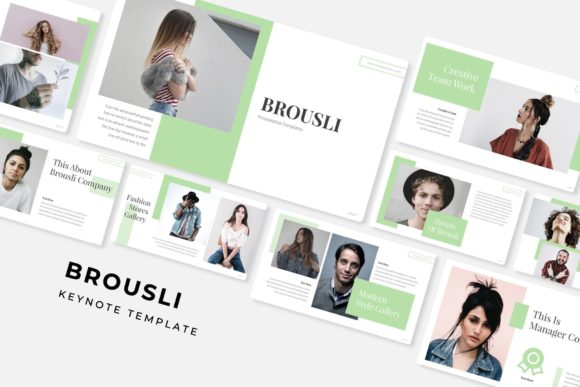
One of the biggest challenges in modern business is the lack of time. Custom-building a presentation from scratch is a luxury few can afford. The Brousli template solves this by offering a comprehensive library of over 150 total slides. This is not just a collection of blank layouts; it is a fully realized design system. The structure is built around five premade color palettes, providing 30 unique slide designs for each variation. This allows you to instantly match the presentation to your specific brand identity or the mood of your pitch. Whether you prefer a bold, high-contrast look or a subtle, minimalist aesthetic, the color options provide immediate versatility.
Furthermore, the inclusion of handcrafted infographics changes the way you can share data. Instead of struggling with Excel charts that don't fit your brand, you have access to pixel-perfect illustrations that make complex information digestible and visually engaging. For those who need to showcase past work, the dedicated gallery and portfolio slides allow you to display high-resolution imagery in a structured, elegant manner. The design relies on Master Slides, which means that if you want to change a font or a global color setting, you can do it once and see the change ripple across the entire deck instantly.
Practical Applications Beyond the Boardroom
While the primary function of the Brousli Keynote Template is to facilitate business presentations, its utility extends far beyond corporate boardrooms. Because the graphics are resizable and editable, and the design is based on a drag-and-drop interface, it becomes a versatile asset for various creative workflows.
Consider the needs of a creative entrepreneur or a small business owner. You might be launching a new product and need to create a lookbook for wholesalers. The portfolio slides are perfect for this. Alternatively, you could use the section break slides to create distinct chapters for an online course or a digital workshop. For marketers, the template can be repurposed to create social media assets. By exporting individual slides as high-quality images, you can generate a consistent series of Instagram posts, Pinterest graphics, or Facebook covers that maintain visual consistency across all platforms.
Here are a few specific scenarios where this design system shines:
- Investor Pitches: Use the clean layouts to let your numbers and data do the talking without visual clutter.
- Brand Guidelines Decks: Utilize the typography placeholders to showcase how your brand fonts and colors interact in real-world applications.
- Webinar Slides: The widescreen format ensures your content looks sharp on monitors and projectors, maintaining readability for remote audiences.
- Client Onboarding: Create a professional welcome packet that guides new clients through your process, establishing trust from day one.
Streamlining the Design Process
For designers and content creators, efficiency is currency. The Brousli template is engineered to minimize the technical friction of presentation design. The "drag & drop" functionality for picture placeholders is a standout feature. You do not need to be an expert in Keynote to achieve professional results. Simply select an image from your library and drop it into the designated frame; the software automatically crops and resizes it to fit perfectly.
This ease of use does not come at the expense of quality. The template boasts pixel-perfect illustrations, meaning that when you zoom in or present on a 4K display, the vectors remain crisp and clear. This attention to detail is crucial for maintaining a professional presentation standard. When you are trying to build brand recognition, consistency is key. Using a template with pre-set grids and alignment guides ensures that your margins are even and your text hierarchy is logical, which significantly improves readability and audience engagement.
What’s Included in Your Download
To ensure you can get started immediately, the package includes everything you need to install and customize the files. The download is structured to be user-friendly, even for those who may not be tech-savvy. You will find:
- 5 PPTX Files: Standard files for wider compatibility.
- 5 PPTX Widescreen Files: Optimized for modern 16:9 monitors and projectors.
- 5 Premade Color Variations: Allowing for quick thematic changes.
- Readme First Guide: Essential instructions on how to install and edit the template.
- Font Information: The template utilizes a free font, and a download link is included in the package so you can maintain the exact typography seen in the preview.
Note: All photographs or pictures used in the preview are not included. They are intended for illustration purposes only to show how the placeholders function. You will need to insert your own brand imagery or use stock photos.
Enhancing Brand Identity Through Typography and Layout
A presentation is often the first tangible touchpoint a potential client or partner has with your brand. If the typography is hard to read or the layout feels disjointed, it creates a subconscious friction. The Brousli template helps improve visual consistency by providing a balanced structure. The section break slides act as visual pauses, allowing the audience to mentally digest the previous section before moving on to the next topic. This pacing is vital for effective storytelling.
By utilizing a premium font that is freely available for commercial use, you avoid the licensing headaches that often plague design projects. The typography choices within the template are designed to be versatile—suitable for both headline display and smaller body text, provided you adhere to standard readability guidelines. When pairing this template with your own brand elements, consider the hierarchy: use the larger, bolder slide layouts for your key value propositions and the more detailed infographic slides for your supporting data.
Ultimately, the goal of any design asset is to serve the message. The Brousli Keynote Template provides the scaffolding so you can focus on the content. It removes the guesswork of layout design, allowing you to present your ideas with clarity, confidence, and a polished visual identity that resonates with modern audiences.