Anabys: Streamline Your Visual Storytelling with This Template
You know that specific kind of dread that hits when you open a blank presentation slide? It’s the blank canvas syndrome, but worse, because unlike a canvas, a slide deck has a very specific purpose: to convey complex information clearly and persuasively. Whether you are a small business owner pitching to investors, a marketer presenting quarterly results, or a designer showcasing a new concept, the tool you use to present is just as important as the content itself. This is where the Anabys Google Slide Template steps in, offering a robust solution that bridges the gap between professional design and functional utility. It is not just about making things look pretty; it is about creating a structured environment where your ideas can take center stage without the distraction of messy layouts or inconsistent formatting.
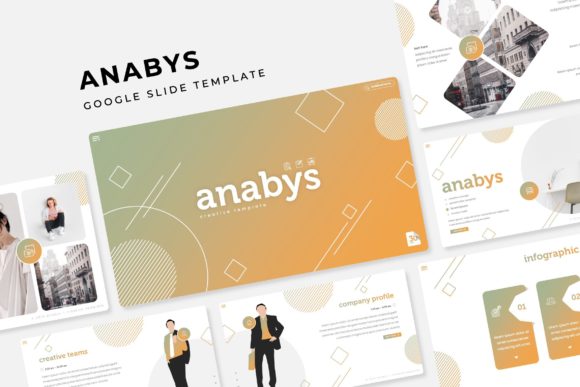
The core appeal of a template like Anabys lies in its versatility. We have all seen the generic "canned" templates that come pre-installed with software—they are functional, sure, but they rarely scream "brand identity." With Anabys, you are working with a foundation that has been handcrafted to support modern typography and visual communication. The inclusion of over 150 total slides means you are unlikely to run out of ways to display your data. Think of it less as a rigid structure and more as a modular toolkit. You have distinct sections for different types of content, allowing you to mix and match based on the flow of your narrative.
Mastering the Modular Approach to Design Assets
One of the most significant hurdles in maintaining a professional image is visual consistency. If you are a startup or a solopreneur, you might not have the budget for a full-time design team to ensure every pixel is perfect. This is where the "Master Slides" functionality becomes your best friend. The Anabys template is built on a system where changes made to the master slide automatically propagate throughout the deck. This ensures that your fonts, colors, and logo placement remain uniform across all 150+ slides. It is a massive time-saver that prevents the embarrassing mistake of having a rogue slide with the wrong brand color popping up during a client meeting.
Furthermore, the template comes with 5 premade color variations. This feature is particularly useful for agencies or freelancers who manage multiple client brands. Instead of starting from scratch every time you switch projects, you can simply select the color scheme that best matches the client's existing identity. The fact that there are 30 slides dedicated to each template variation ensures that the design logic remains intact regardless of the palette you choose. It speaks to a level of design thinking that prioritizes the user's workflow. You are not just buying slides; you are buying a system that adapts to different branding scenarios.
Visual Storytelling: Infographics and Portfolio Sections
Data visualization is often where presentations go to die. A wall of numbers on a slide is the fastest way to lose your audience's attention. The Anabys template addresses this head-on with its handcrafted infographics. These are not just generic pie charts; they are designed to be visually engaging assets that help tell the story behind the numbers. Whether you are explaining a marketing funnel, a supply chain process, or a timeline of company milestones, having a pre-designed graphic element allows you to translate dry data into a compelling visual narrative. This is crucial for improving audience engagement—people process visual information much faster than text.
For creatives, the Gallery and Portfolio slides are arguably the highlight. If you are a photographer, architect, or graphic designer, your presentation is essentially your portfolio. The layout of these slides focuses on high-impact imagery. The "Resizable and Editable Graphic Picture Placeholder" feature is a game-changer here. It allows you to simply drag and drop your high-resolution images into designated areas. The template handles the cropping and sizing, ensuring your work is displayed with "pixel-perfect" precision. This removes the technical barrier of image editing within the presentation software, allowing you to focus on curating the best examples of your work.
Practical Workflow: Drag & Drop Efficiency
Time is a finite resource, especially for small business owners juggling multiple roles. The efficiency of the Anabys Google Slide Template is evident in its user-centric features. The "Drag & Drop" capability is not just a buzzword; it fundamentally changes how you interact with the software. Instead of wrestling with alignment tools or trying to resize text boxes to fit an image, you can rely on the pre-set placeholders. This is particularly helpful when you are under a deadline. You can assemble a professional-looking deck in a fraction of the time it would take to build one from scratch.
Another practical consideration is the file format and compatibility. The package includes 5 PPTX Files specifically formatted for widescreen displays. This is the standard for modern projectors and monitors, ensuring your presentation doesn't look stretched or compressed. The inclusion of "Section Break Slides" also helps in organizing your thoughts. It provides a visual pause for the audience, signaling that you are moving to a new topic. This pacing is essential for effective communication, allowing your message to sink in before moving on to the next point.
Beyond the Slide Deck: Brand Identity and Consistency
While the primary function of this asset is for presentations, the principles behind the Anabys Google Slide Template extend to broader brand identity work. The typography choices included in the package are designed to be versatile enough for various applications. When you are building a brand, consistency across all touchpoints is key. The visual language established in your presentation should echo the feel of your website, your social media graphics, and your print materials.
Consider using the template's layout structures as inspiration for other projects. The way text and images are balanced on the portfolio slides, for example, could inform the layout of a brochure or a landing page. The "Modern Typography" utilized in the template helps in maintaining a contemporary look, which is vital for businesses wanting to appear relevant and trustworthy. By mastering the use of these design assets in a presentation setting, you naturally develop an eye for layout and composition that can be applied to packaging design or editorial layouts.
Finalizing Your Presentation: The "Readme First" Essentials
Before you dive into customization, taking a moment to review the included documentation is a smart move. The package comes with a "Readme First" file, which is often overlooked but contains critical information. It details the specific fonts used and, importantly, includes links for free font downloads. Typography is the voice of your design; if you open the file and the fonts are missing, the layout can break, leading to a frustrating experience. Ensuring you have the correct fonts installed guarantees that the spacing and hierarchy intended by the designer are preserved.
It is also worth noting the disclaimer regarding photographs. The preview images are for illustration purposes to show you what is possible, but the actual template contains placeholders. This is standard practice with premium design assets. It encourages you to use your own high-quality imagery, which is always preferable for branding. Stock photos can feel generic, whereas your own photos—of your team, your products, or your workspace—add a layer of authenticity that resonates with viewers. Ultimately, the Anabys Google Slide Template provides the framework, but your unique content is what brings it to life. It is a tool designed to amplify your message, not overshadow it.