Streamline Your Brand Narrative with the Nakita Slide System
Every entrepreneur or creative professional eventually hits that frustrating wall where the content is brilliant, but the visual delivery feels disjointed. You have the data, the strategy, and the pitch, but cobbling together a presentation that looks cohesive often takes longer than creating the material itself. This is where the Nakita Google Slide Template enters the conversation, offering a solution that bridges the gap between raw information and polished visual storytelling. It isn't just about having pre-made boxes for text; it is about adopting a structured design language that communicates authority before you even speak a word.
A Comprehensive Ecosystem for Visual Communication
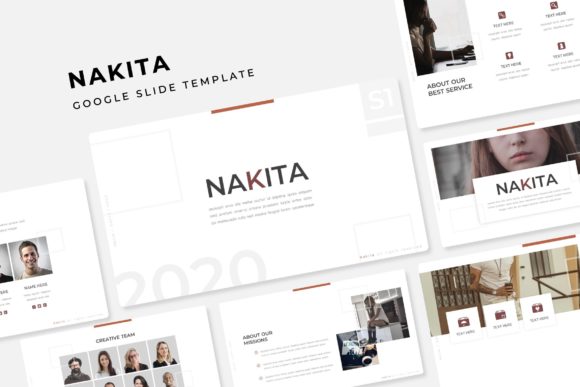
The defining feature of this package is its sheer volume and versatility. With 150+ total slides, you are not buying a single presentation; you are acquiring a design ecosystem. The package includes 5 PPTX Widescreen files, each built around a distinct color variation. This "5 premade color" approach is incredibly practical. Instead of manually tweaking hex codes to match your brand guidelines, you can select the variation that best resonates with your current campaign mood. Whether you are pitching to investors, running a workshop, or presenting a quarterly review, having 30 unique slide layouts per color template ensures you never have to reuse the same layout twice in a single deck.
The architecture of the Nakita Google Slide Template is built on a foundation of efficiency. Because it is based on Master Slides, making global changes is effortless. If you decide halfway through that you need to change the font or adjust the footer placement, you do not need to edit 150 individual pages. You simply update the master, and the changes ripple across the entire presentation. This "pixel-perfect" infrastructure is vital for maintaining that high-end, professional look that clients expect.
Infographics and Visual Assets That Drive Engagement
Data visualization is often the weakest link in business presentations. We have all seen slides where the charts are blurry, the icons are mismatched, or the layout is cluttered. Nakita addresses this with handcrafted infographics that transform dry statistics into engaging narratives. These aren't generic clip-art shapes; they are designed to guide the viewer's eye, making complex data digestible at a glance.
Furthermore, the inclusion of section break slides and a dedicated gallery/portfolio section allows for a natural flow in your storytelling. If you are a photographer, architect, or designer, the ability to showcase high-resolution imagery is non-negotiable. The "resizable and editable graphic picture placeholders" are a game-changer here. You can simply drag and drop your images into the designated areas, and the template handles the cropping and scaling to fit the layout perfectly. This feature alone saves hours of formatting time and ensures that your portfolio looks consistent and curated.
Practical Applications Across Industries
While the Nakita Google Slide Template is technically a presentation file, its utility extends far beyond the boardroom. For social media managers and content creators, these slides serve as excellent templates for Instagram carousels or educational infographics on Pinterest. The widescreen format is optimized for video content, making it perfect for recording webinars, online courses, or YouTube tutorials where you need a visual backdrop that looks professional.
Small business owners can leverage the clean layouts for internal documentation, such as employee onboarding manuals or standard operating procedures (SOPs). The structured hierarchy of the slides—combining headers, body text, and visual elements—makes information retention easier for your team. For those in the marketing sphere, the templates can be repurposed for digital lookbooks or product catalogs, offering a sophisticated alternative to a standard PDF attachment.
Seamless Integration and Usability
One of the most significant hurdles with premium design assets is compatibility. Nakita alleviates this stress by including PPTX files that are fully compatible with both PowerPoint and Google Slides. The package comes with a "Readme First" document, which is a small but crucial detail that shows a commitment to user experience. It guides you through the setup process, ensuring you don't miss any steps.
Typography plays a massive role in the template's aesthetic. The fonts used are modern and legible, and crucially, the package includes free font download links. This eliminates the dreaded "missing font" error messages that often plague design files shared across different computers. Whether you are working on a Mac or a PC, the system is designed to be plug-and-play. The "pixel-perfect illustrations" ensure that even if you scale elements up or down, the quality remains crisp, avoiding the jagged edges often associated with lower-quality assets.
Design Consistency and Brand Recognition
Visual consistency is the bedrock of brand recognition. When your marketing materials, pitch decks, and internal documents all share a cohesive visual DNA, it builds trust with your audience. The Nakita Google Slide Template acts as a style guide in itself. By utilizing the 5 premade color palettes, you can align your presentations with your broader brand identity without needing a graphic designer on speed dial.
The ability to edit these graphics is vital. You can match the colors to your specific brand hex codes, swap out the fonts to match your brand typeface, and adjust the layouts to prioritize your specific content needs. This flexibility allows you to maintain a consistent voice across all platforms. Whether you are presenting a keynote speech or sending a proposal to a client, the visual language remains unified, reinforcing your professionalism and attention to detail.
Final Thoughts on Workflow Efficiency
In the fast-paced world of digital marketing and entrepreneurship, time is the most valuable currency. The Nakita Google Slide Template is ultimately a tool for reclaiming that time. Instead of starting from a blank canvas every time you need to communicate an idea, you start with a professional framework. The drag-and-drop functionality, combined with the extensive library of 150+ slides, means you can assemble a high-quality presentation in minutes rather than hours.
It is important to note that while the template provides the structure, the content remains yours. The placeholder images are intended for illustration, prompting you to insert your own high-quality photography that tells your unique story. This distinction ensures that your final product is authentic to your brand. For the entrepreneur looking to scale their operations, the freelancer aiming to impress clients, or the marketer striving for clarity, this collection offers a robust foundation for all your visual communication needs.