Devalon Power Point Template: A Versatile Suite for Modern Brands
Let's be honest: creating a presentation that looks truly professional and cohesive can be a major time sink. You spend hours fiddling with layouts, trying to match colors, and sourcing graphics that don't look like they're from 1998. The Devalon Power Point Template is built to solve that exact problem. It's not just a single slide deck; it's a comprehensive toolkit designed for anyone who needs to communicate ideas with clarity and visual polish, from entrepreneurs pitching investors to marketers outlining a new campaign. This isn't about flashy animations—it's about providing a solid, adaptable foundation so you can focus on your message.
Beyond a Single Deck: The Power of 150+ Organized Slides
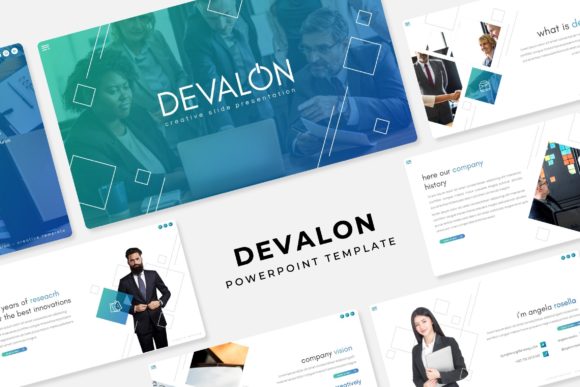
What sets this template apart is its sheer volume and thoughtful organization. We're talking about over 150 total slides, but they're not just duplicates with different text. The collection is split into five distinct, premade color themes, each containing 30 meticulously designed slides. This structure means you're not starting from a blank slate. Need a professional, corporate-friendly look? There's a color scheme for that. Aiming for something more vibrant and energetic for a creative brand? Another theme is ready to go. This approach saves you from the tyranny of choice and the paralysis of building a color palette from scratch. The consistency across all slides within a theme ensures your presentation feels unified, which is a cornerstone of strong brand identity.
The real value for small business owners and content creators is in the practical, handcrafted elements included. Forget struggling to create complex charts or diagrams. The package includes handcrafted infographics directly within PowerPoint, allowing you to present data and processes in a visually engaging way that your audience will actually understand. Section break slides are thoughtfully integrated, giving your presentation a natural, logical flow. For those in visual fields, the dedicated gallery and portfolio slides are a game-changer. Instead of just describing your work, you can showcase it directly within your pitch or review, using the provided picture placeholders. The fact that every graphic is resizable and editable, and that the entire template is based on master slides, means you have granular control without breaking the design system. You can adjust elements to fit your specific content while maintaining pixel-perfect alignment and professional aesthetics.
Practical Applications for Everyday Projects
Think of this template suite as a multi-tool for your visual communication needs. Its utility extends far beyond a standard boardroom presentation.
- Brand Onboarding & Guidelines: Use the structured slides to create a clear, visual brand guide for new team members or contractors. Outline your mission, logo usage, color codes, and typography in a format that's easy to follow and reference.
- Client Proposals & Pitches: Transform a standard proposal into a compelling narrative. The portfolio slides let you showcase past successes, while the infographic slides can outline your process or pricing structure clearly, building trust and professionalism.
- Internal Training & Workshops: Develop training materials that are engaging and easy to digest. The consistent layout helps learners focus on the content, and the variety of slide types allows you to mix text, images, and diagrams effectively.
- Social Media Content Planning: Plan your content calendar visually. Use the slides to map out post themes, draft key messages, and even mock up how graphics will look on different platforms, all within one cohesive document.
- Product Launch Kits: Assemble all the key information for a new product launch—features, benefits, target audience, marketing angles—into a single, shareable deck that aligns your team and can be adapted for different audiences.
The drag-and-drop picture placeholder functionality is particularly useful for these applications. You can quickly swap in your own product photos, team headshots, or branded graphics without worrying about cropping or alignment issues. This makes the template incredibly adaptable for packaging mockups, website hero section planning, or even creating templates for blog post graphics.
What's in the Box and How to Get Started
When you download the Devalon Power Point Template, you receive a straightforward package designed for immediate use. The core deliverables are five PPTX files for standard aspect ratios and five PPTX files formatted for widescreen displays, each corresponding to one of the five premade color themes. This ensures your presentation looks sharp whether you're projecting on a traditional screen or a modern widescreen monitor.
A crucial, often overlooked component is the included "Readme First" file. This document is your quick-start guide, detailing the template's structure, any specific instructions, and most importantly, the font information. The template uses free fonts, and the download includes direct links to where you can legally obtain them. This eliminates the frustrating "missing font" errors that can derail your workflow and ensures typographic consistency from the start. It’s a small detail that speaks to a practical, user-focused design philosophy.
A quick but important note: The photographs and pictures used in the preview images are for illustration only and are not included in the package. You will need to supply your own images, which is actually a benefit—it allows you to fully customize the template with your own unique brand assets and photography, making the final result truly yours.
Making It Your Own: Design Considerations
While the template provides a robust framework, a little strategic customization can elevate it further. Consider your audience and goal. If you're presenting to a conservative industry, stick closely to one of the more subdued color themes and use the clean, sans-serif style slides. For a creative audience, feel free to mix in more dynamic layouts and leverage the infographic slides to tell a visual story.
Typography is key. The free fonts included are chosen for their readability and modern appeal. However, if your brand has specific typefaces, you can update the master slides to reflect them. Just be mindful of readability—ensure your chosen body font is clear at small sizes and that your display font has enough impact without being distracting. A good practice is to limit yourself to two or three fonts maximum across the entire presentation to maintain cohesion.
Ultimately, the Devalon Power Point Template is a powerful design asset because it prioritizes function and flexibility. It’s not about being the flashiest template on the market; it’s about providing a reliable, professional, and extensive set of tools that help you communicate better. For the entrepreneur who needs to look established, the marketer who needs to present data clearly, or the content creator who needs to plan visually, it offers a shortcut to polished, consistent output without sacrificing creative control. It turns the chore of presentation design into a more streamlined, even enjoyable, part of your workflow.